
Input & clipboard
Virtual input events and clipboard text.
These calls synthesize input or place text on a clipboard.
- Key codes are Windows virtual-key codes. Mouse coordinates are Roblox viewport pixels.
- Input is virtual. Keys, buttons and the wheel go straight to the Roblox client as raw input, never through Windows, so other applications do not see them and the real keyboard and pointer are untouched.
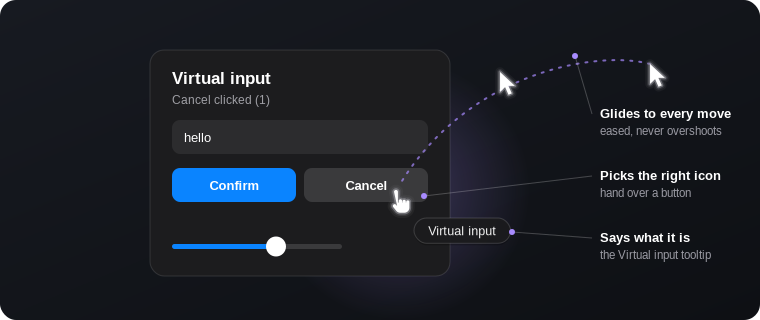
- mousemoveabs and mousemoverel drive a virtual cursor that Roblox reports for 5 seconds after the last move. Acedia draws it on screen with a Virtual input tooltip; see Virtual cursor.
Functions
| Function | Purpose |
|---|---|
| Virtual cursor | How virtual input reaches Roblox, and the on-screen cursor that shows it. |
| setclipboard | Replaces the system clipboard text. |
| setrbxclipboard | Copies text or a partial serialized Instance tree to the clipboard. |
| keypress | Presses a Windows virtual-key code. |
| keyrelease | Releases a Windows virtual-key code. |
| keytap | Presses and immediately releases a Windows virtual-key code. |
| mouse1click | Clicks the left mouse button. |
| mouse1press | Presses the left mouse button. |
| mouse1release | Releases the left mouse button. |
| mouse2click | Clicks the right mouse button. |
| mouse2press | Presses the right mouse button. |
| mouse2release | Releases the right mouse button. |
| mousemoveabs | Moves the virtual cursor to Roblox viewport coordinates. |
| mousemoverel | Moves the virtual cursor by relative offsets. |
| mousescroll | Sends a mouse-wheel delta to the Roblox client. |